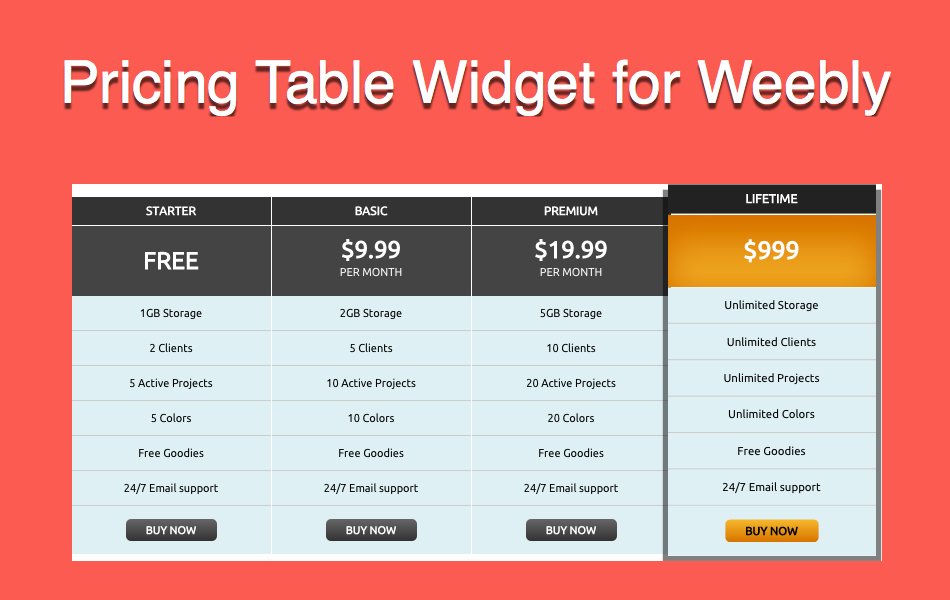
如何在Weebly网站中添加定价表
早些时候,Weebly建站没有任何选项可以在编辑器上添加定价表小部件。 不过,后来 Weebly 通过 App Center 推出了一款免费的“价格图表”应用。 此应用程序可帮助您在您的网站上添加简单的定价表。 这是 Weebly 的免费应用程序之一,我们希望将来可能有许多其他定价表应用程序供用户选择。 在本文中,我们将解释如何在 Weebly 网站中添加免费定价表。
推荐:如何在非响应主题中添加Weebly Pro标题幻灯片
在 Weebly 中添加定价表
您可以使用以下方法在 Weebly 中添加定价表。
- 使用 App Center 中的价格图表应用程序
- 使用自定义脚本的定价表小部件
让我们详细解释这两种方法。
Weebly 价格图表应用程序
首先让我们讨论一下价格图表应用程序,该应用程序可在“电子商务” Weebly 应用中心的类别。 当您在Weebly建站编辑器中时,转到“应用程序”部分并搜索定价图表应用程序。 找到应用程序后,您可以将应用程序连接到您的站点。 查看我们关于如何将应用程序从 Weebly App Center 连接到您的站点的文章。
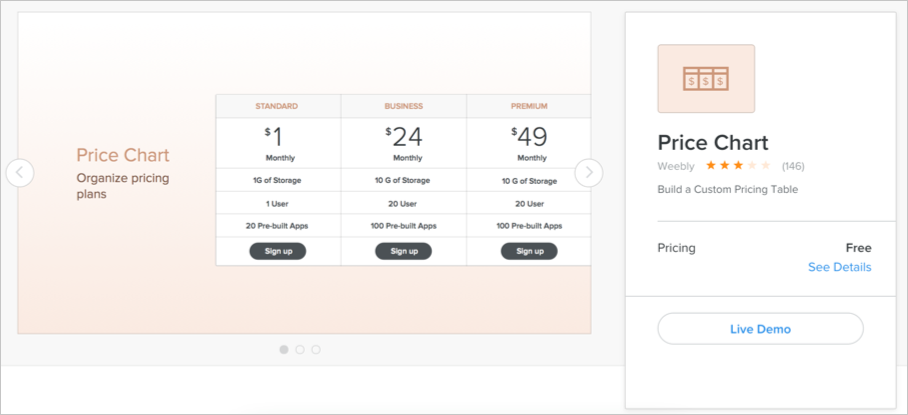
成功连接应用程序后,转到“构建”选项卡并拖动页面上要添加定价表的元素。 定价表如下所示。 您可以自定义表格的文本、按钮、大小和颜色。
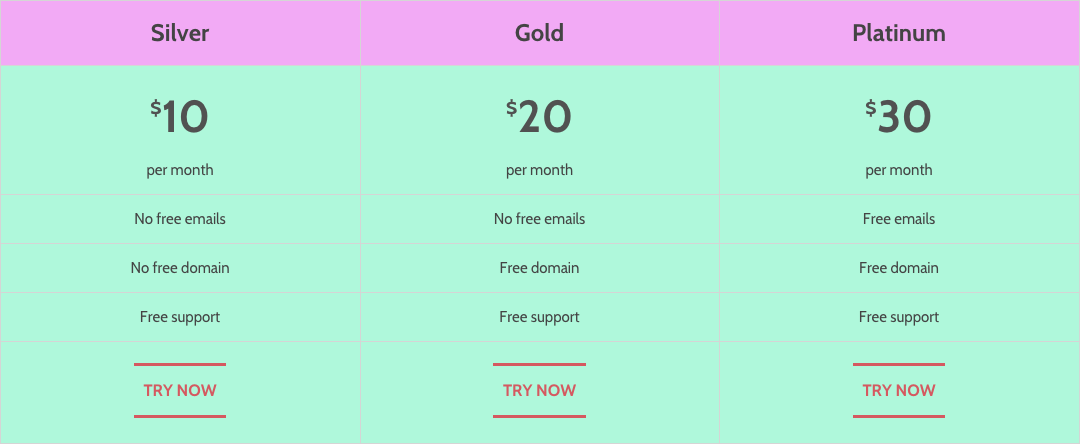
免费价格图表应用程序的特点
价格图表应用程序由Weebly建站发布,因此您可以假设与Weebly建站编辑器的集成将比任何其他应用程序更容易。 请记住,您必须将应用程序分别连接到您的每个站点并使用以下功能:
- 小部件具有计划、功能和按钮元素。
- 这是一个完整的小部件,这意味着您不能在其间拖动任何其他元素。
- 尽管该小部件允许无限的计划和功能,但我们建议严格限制为 3 到 5 个计划。
- 您可以根据需要自定义背景颜色。
使用脚本的定价表小部件
默认的 Weebly 应用程序应该在移动设备上响应并自动对齐。 但是,它不能在手机上正常运行,并且在编辑器中编辑内容时也会产生烦人的体验。 因此,我们在这里解释的第二个选项是使用免费 StyleFix 和 PrefixFree 脚本的自定义定价表小部件。 小部件将如下所示:
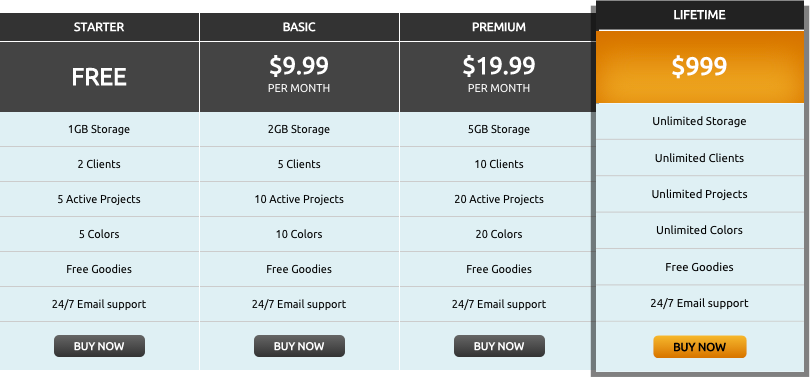
您可以按照以下步骤在您的 Weebly 站点中添加小部件。
- 添加脚本
- 添加自定义 CSS 样式
- 嵌入 HTML 代码
添加脚本
在“页面 > 选择页面 > SEO 设置 > 页脚代码” 您的 Weebly 网站的部分。
< script >
    /**
     * StyleFix 1.0.3 & PrefixFree 1.0.7
     * @author Lea Verou
     * MIT license
     */
    (function() {
        function t(e, t) {
            return [].slice.call((t || document).querySelectorAll(e))
        }
        if (!window.addEventListener) return;
        var e = window.StyleFix = {
            link: function
                try {
                    if (t.rel !== "stylesheet" || t.hasAttribute("data-noprefix")) return
                } catch (n) {
                    return
                }
                var r = t.href || t.getAttribute("data-href"),
                    i = r.replace(/[^\/]+$/, ""),
                    s = (/^[a-z]{3,10}:/.exec(i) || [""])[0],
                    o = (/^[a-z]{3,10}:\/\/[^\/]+/.exec(i) || [""])[0],
                    u = /^([^?]*)\??/.exec(r)[1],
                    a = t.parentNode,
                    f = new XMLHttpRequest,
                    l;
                f.onreadystatechange = function() {
                    f.readyState === 4 && l()
                };
                l = function() {
                    var n = f.responseText;
                    if (n && t.parentNode && (!f.status || f.status < 400 || f.status > 600)) {
                        n = e.fix(n, !0, t);
                        if (i) {
                            n = n.replace(/url\(\s*?((?:"|')?)(.+?)\1\s*?\)/gi, function(e, t, n) {
                                return /^([a-z]{3,10}:|#)/i.test(n) ? e : /^\/\//.test(n) ? 'url("' + s + n + '")' : /^\//.test(n) ? 'url("' + o + n + '")' : /^\?/.test(n) ? 'url("' + u + n + '")' : 'url("' + i + n + '")'
                            });
                            var r = i.replace(/([\\\^\$*+[\]?{}.=!:(|)])/g, "\\$1");
                            n = n.replace(RegExp("\\b(behavior:\\s*?url\\('?\"?)" + r, "gi"), "$1")
                        }
                        var l = document.createElement("style");
                        l.textContent = n;
                        l.media = t.media;
                        l.disabled = t.disabled;
                        l.setAttribute("data-href", t.getAttribute("href"));
                        a.insertBefore(l, t);
                        a.removeChild
                        l.media = t.media
                    }
                };
                try {
                    f.open("GET", r);
                    f.send(null)
                } catch (n) {
                    if (typeof XDomainRequest != "undefined") {
                        f = new XDomainRequest;
                        f.onerror = f.onprogress = function() {};
                        f.onload = l;
                        f.open("GET", r);
                        f.send(null)
                    }
                }
                t.setAttribute("data-inprogress", "")
            },
            styleElement: function
                if (t.hasAttribute("data-noprefix")) return;
                var n = t.disabled;
                t.textContent = e.fix(t.textContent, !0, t);
                t.disabled = n
            },
            styleAttribute: function
                var n = t.getAttribute("style");
                n = e.fix(n, !1, t);
                t.setAttribute("style", n)
            },
            process: function() {
                t('link[rel="stylesheet"]:not([data-inprogress])').forEach(StyleFix.link);
                t("style").forEach(StyleFix.styleElement);
                t("[style]").forEach(StyleFix.styleAttribute)
            },
            register: function(t, n) {
                (e.fixers = e.fixers || []).splice(n === undefined ? e.fixers.length : n, 0, t)
            },
            fix: function(t, n, r) {
                for (var i = 0; i < e.fixers.length; i++) t = e.fixers[i](t, n, r) || t;
                return t
            },
            camelCase: function(e) {
                return e.replace(/-([a-z])/g, function(e, t) {
                    return t.toUpperCase()
                }).replace("-", "")
            },
            deCamelCase: function(e) {
                return e.replace(/[A-Z]/g, function(e) {
                    return "-" + e.toLowerCase()
                })
            }
        };
        (function() {
            setTimeout(function() {
                t('link[rel="stylesheet"]').forEach(StyleFix.link)
            }, 10);
            document.addEventListener("DOMContentLoaded", StyleFix.process, !1)
        })()
    })();
(function(e) {
    function t(e, t, r, i, s) {
        e = n[e];
        if (e.length) {
            var o = RegExp(t + "(" + e.join("|") + ")" + r, "gi");
            s = s.replace(o, i)
        }
        return s
    }
    if (!window.StyleFix || !window.getComputedStyle) return;
    var n = window.PrefixFree = {
        prefixCSS: function(e, r, i) {
            var s = n.prefix;
            n.functions.indexOf("linear-gradient") > -1 && (e = e.replace(/(\s|:|,)(repeating-)?linear-gradient\(\s*(-?\d*\.?\d*)deg/ig, function(e, t, n, r) {
                return t + (n || "") + "linear-gradient(" + (90 - r) + "deg"
            }));
            e = t("functions", "(\\s|:|,)", "\\s*\\(", "$1" + s + "$2(", e);
            e = t("keywords", "(\\s|:)", "(\\s|;|\\}|$)", "$1" + s + "$2$3", e);
            e = t("properties", "(^|\\{|\\s|;)", "\\s*:", "$1" + s + "$2:", e);
            if (n.properties.length) {
                var o = RegExp("\\b(" + n.properties.join("|") + ")(?!:)", "gi");
                e = t("valueProperties", "\\b", ":(.+?);", function(e) {
                    return e.replace(o, s + "$1")
                }, e)
            }
            if (r) {
                e = t("selectors", "", "\\b", n.prefixSelector, e);
                e = t("atrules", "@", "\\b", "@" + s + "$1", e)
            }
            e = e.replace(RegExp("-" + s, "g"), "-");
            e = e.replace(/-\*-(?=[a-z]+)/gi, n.prefix);
            return e
        },
        property: function(e) {
            return (n.properties.indexOf(e) ? n.prefix : "") + e
        },
        value: function(e, r) {
            e = t("functions", "(^|\\s|,)", "\\s*\\(", "$1" + n.prefix + "$2(", e);
            e = t("keywords", "(^|\\s)", "(\\s|$)", "$1" + n.prefix + "$2$3", e);
            return e
        },
        prefixSelector: function(e) {
            return e.replace(/^:{1,2}/, function(e) {
                return e + n.prefix
            })
        },
        prefixProperty: function(e, t) {
            var r = n.prefix + e;
            return t ? StyleFix.camelCase(r) : r
        }
    };
    (function() {
        var e = {},
            t = [],
            r = {},
            i = getComputedStyle(document.documentElement, null),
            s = document.createElement("div").style,
            o = function(n) {
                if (n.charAt(0) === "-") {
                    t.push(n);
                    var r = n.split("-"),
                        i = r[1];
                    e[i] = ++e[i] || 1;
                    while (r.length > 3) {
                        r.pop();
                        var s = r.join("-");
                        u(s) && t.indexOf(s) === -1 && t.push(s)
                    }
                }
            },
            u = function(e) {
                return StyleFix.camelCase(e) in s
            };
        if (i.length > 0)
            for (var a = 0; a < i.length; a++) o(i[a]);
        else
            for (var f in i) o(StyleFix.deCamelCase(f));
        var l = {
            uses: 0
        };
        for (var c in e) {
            var h = e[c];
            l.uses < h && (l = {
                prefix: c,
                uses: h
            })
        }
        n.prefix = "-" + l.prefix + "-";
        n.Prefix = StyleFix.camelCase(n.prefix);
        n.properties = [];
        for (var a = 0; a < t.length; a++) {
            var f = t[a];
            if (f.indexOf(n.prefix) === 0) {
                var p = f.slice(n.prefix.length);
                u(p) || n.properties.push(p)
            }
        }
        n.Prefix == "Ms" && !("transform" in s) && !("MsTransform" in s) && "msTransform" in s && n.properties.push("transform", "transform-origin");
        n.properties.sort()
    })();
    (function() {
        function i(e, t) {
            r
            r
            return !!r
        }
        var e = {
            "linear-gradient": {
                property: "backgroundImage",
                params: "red, teal"
            },
            calc: {
                property: "width",
                params: "1px + 5%"
            },
            element: {
                property: "backgroundImage",
                params: "#foo"
            },
            "cross-fade": {
                property: "backgroundImage",
                params: "url(a.png), url(b.png), 50%"
            }
        };
        e["repeating-linear-gradient"] = e["repeating-radial-gradient"] = e["radial-gradient"] = e["linear-gradient"];
        var t = {
            initial: "color",
            "zoom-in": "cursor",
            "zoom-out": "cursor",
            box: "display",
            flexbox: "display",
            "inline-flexbox": "display",
            flex: "display",
            "inline-flex": "display",
            grid: "display",
            "inline-grid": "display",
            "min-content": "width"
        };
        n.functions = [];
        n.keywords = [];
        var r = document.createElement("div").style;
        for (var s in e) {
            var o = e[s],
                u = o.property,
                a = s + "(" + o.params + ")";
            !i(a, u) && i(n.prefix + a, u) && n.functions.push(s)
        }
        for (var f in t) {
            var u = t[f];
            !i(f, u) && i(n.prefix + f, u) && n.keywords.push(f)
        }
    })();
    (function() {
        function s(e) {
            i.textContent = e + "{}";
            return !!i.sheet.cssRules.length
        }
        var t = {
                ":read-only": null,
                ":read-write": null,
                ":any-link": null,
                "::selection": null
            },
            r = {
                keyframes: "name",
                viewport: null,
                document: 'regexp(".")'
            };
        n.selectors = [];
        n.atrules = [];
        var i = e.appendChild(document.createElement("style"));
        for (var o in t) {
            var u = o + (t[o] ? "(" + t[o] + ")" : "");
            !s(u) && s(n.prefixSelector(u)) && n.selectors.push(o)
        }
        for (var a in r) {
            var u = a + " " + (r[a] || "");
            !s("@" + u) && s("@" + n.prefix + u) && n.atrules.push(a)
        }
        e.removeChild(i)
    })();
    n.valueProperties = ["transition", "transition-property"];
    e.className += " " + n.prefix;
    StyleFix.register(n.prefixCSS)
})(document.documentElement);
< /script>
添加自定义 CSS 代码
第二步是在“页面 > 选择页面 > SEO 设置 > 标题代码“。

<style type="text/css" media="screen">
.pricing_table {
line-height: 150%;
font-size: 12px;
margin: 0 auto;
width: 75%;
max-width: 800px;
padding-top: 10px;
}
.price_block {
text-align: center;
width: 100%;
color: #fff;
float: left;
list-style-type: none;
transition: all 0.25s;
position: relative;
box-sizing: border-box;
margin-bottom: 10px;
border-bottom: 1px solid transparent;
}
/*Pricing Table Header Block with Plans*/
.pricing_table h3 {
text-transform: uppercase;
padding: 5px 0;
background: #333;
margin: -10px 0 1px 0;
}
/*Price tag section*/
.price {
display: table;
background: #444;
width: 100%;
height: 70px;
}
.price_figure {
font-size: 24px;
text-transform: uppercase;
vertical-align: middle;
display: table-cell;
}
.price_number {
font-weight: bold;
display: block;
}
.price_tenure {
font-size: 11px;
}
/* Pricing Plan Features*/
.features {
background: #def0f4;
color: #000;
}
.features li {
padding: 8px 15px;
border-bottom: 1px solid #ccc;
font-size: 11px;
list-style-type: none;
}
.footer {
padding: 15px;
background: #DEF0F4;
}
.action_button {
text-decoration: none;
color: #fff;
font-weight: bold;
border-radius: 5px;
background: linear-gradient(#666, #333);
padding: 5px 20px;
font-size: 11px;
text-transform: uppercase;
}
.price_block:hover {
box-shadow: 0 0 0px 5px rgba(0, 0, 0, 0.5);
transform: scale(1.04) translateY(-5px);
z-index: 1;
border-bottom: 0 none;
}
.price_block:hover .price {
background:linear-gradient(#DB7224, #F9B84A);
box-shadow: inset 0 0 45px 1px #DB7224;
}
.price_block:hover h3 {
background: #222;
}
.price_block:hover .action_button {
background: linear-gradient(#F9B84A, #DB7224);
}
@media only screen and (min-width : 480px) and (max-width : 768px) {
.price_block {width: 50%;}
.price_block:nth-child(odd) {border-right: 1px solid transparent;}
.price_block:nth-child(3) {clear: both;}
.price_block:nth-child(odd):hover {border: 0 none;}
}
@media only screen and (min-width : 768px){
.price_block {width: 25%;}
.price_block {border-right: 1px solid transparent; border-bottom: 0 none;}
.price_block:last-child {border-right: 0 none;}
.price_block:hover {border: 0 none;}
}
.skeleton, .skeleton ul, .skeleton li, .skeleton div, .skeleton h3, .skeleton span, .skeleton p {
border: 5px solid rgba(255, 255, 255, 0.9);
border-radius: 5px;
margin: 7px !important;
background: rgba(0, 0, 0, 0.05) !important;
padding: 0 !important;
text-align: left !important;
display: block !important;
width: auto !important;
height: auto !important;
font-size: 10px !important;
font-style: italic !important;
text-transform: none !important;
font-weight: normal !important;
color: black !important;
}
.skeleton .label {
font-size: 11px !important;
font-style: italic !important;
text-transform: none !important;
font-weight: normal !important;
color: white !important;
border: 0 none !important;
padding: 5px !important;
margin: 0 !important;
float: none !important;
text-align: left !important;
text-shadow: 0 0 1px white;
background: none !important;
}
.skeleton {
display: none !important;
margin: 100px !important;
clear: both;
}
</style>
您可以根据需要自定义任何属性,如字体大小、颜色等,以适应您网站的布局。
添加 HTML 代码
Weebly建站最后一步是拖放一个“嵌入代码” 页面上的元素,您要在其中添加定价表并插入以下 HTML 代码。 不要忘记用您自己的替换内容和链接 URL。
<ul class="pricing_table">
		<li class="price_block">
			<h3>Starter</h3>
			<div class="price">
				<div class="price_figure">
					<span class="price_number">FREE</span>
				</div>
			</div>
			<ul class="features">
				<li>1GB Storage</li>
				<li>2 Clients</li>
				<li>5 Active Projects</li>
				<li>5 Colors</li>
				<li>Free Goodies</li>
				<li>24/7 Email support</li>
			</ul>
			<div class="footer">
				<a href="#" class="action_button">Buy Now</a>
			</div>
		</li>
		<li class="price_block">
			<h3>Basic</h3>
			<div class="price">
				<div class="price_figure">
					<span class="price_number">$9.99</span>
					<span class="price_tenure">per month</span>
				</div>
			</div>
			<ul class="features">
				<li>2GB Storage</li>
				<li>5 Clients</li>
				<li>10 Active Projects</li>
				<li>10 Colors</li>
				<li>Free Goodies</li>
				<li>24/7 Email support</li>
			</ul>
			<div class="footer">
				<a href="#" class="action_button">Buy Now</a>
			</div>
		</li>
		<li class="price_block">
			<h3>Premium</h3>
			<div class="price">
				<div class="price_figure">
					<span class="price_number">$19.99</span>
					<span class="price_tenure">per month</span>
				</div>
			</div>
			<ul class="features">
				<li>5GB Storage</li>
				<li>10 Clients</li>
				<li>20 Active Projects</li>
				<li>20 Colors</li>
				<li>Free Goodies</li>
				<li>24/7 Email support</li>
			</ul>
			<div class="footer">
				<a href="#" class="action_button">Buy Now</a>
			</div>
		</li>
		<li class="price_block">
			<h3>Lifetime</h3>
			<div class="price">
				<div class="price_figure">
					<span class="price_number">$999</span>
				</div>
			</div>
			<ul class="features">
				<li>Unlimited Storage</li>
				<li>Unlimited Clients</li>
				<li>Unlimited Projects</li>
				<li>Unlimited Colors</li>
				<li>Free Goodies</li>
				<li>24/7 Email support</li>
			</ul>
			<div class="footer">
				<a href="#" class="action_button">Buy Now</a>
			</div>
		</li>
	</ul>


	<ul class="skeleton pricing_table" style="margin-top: 100px; overflow: hidden;">
		<li class="label" style="margin: 0 none;">ul.pricing_table</li>
		<li class="price_block">
			<span class="label">li.price_block</span>
			<h3><span class="label">h3</span></h3>
			<div class="price">
				<span class="label">div.price</span>
				<div class="price_figure">
					<span class="label">div.price_figure</span>
					<span class="price_number">
						<span class="label">span.price_number</span>
					</span>
					<span class="price_tenure">
						<span class="label">span.price_tenure</span>
					</span>
				</div>
			</div>
			<ul class="features">
				<li class="label">ul.features</li>
				<br /><br /><br />
			</ul>
			<div class="footer">
				<span class="label">div.footer</span>
			</div>
		</li>


		<li class="price_block" style="opacity: 0.5;">
			<span class="label">li.price_block</span>
			<h3><span class="label">h3</span></h3>
			<div class="price">
				<span class="label">div.price</span>
				<div class="price_figure">
					<span class="label">div.price_figure</span>
					<span class="price_number">
						<span class="label">span.price_number</span>
					</span>
					<span class="price_tenure">
						<span class="label">span.price_tenure</span>
					</span>
				</div>
			</div>
			<ul class="features">
				<li class="label">ul.features</li>
				<br /><br /><br />
			</ul>
			<div class="footer">
				<span class="label">div.footer</span>
			</div>
		</li>
		<li class="price_block" style="opacity: 0.25;">
			<span class="label">li.price_block</span>
			<h3><span class="label">h3</span></h3>
			<div class="price">
				<span class="label">div.price</span>
				<div class="price_figure">
					<span class="label">div.price_figure</span>
					<span class="price_number">
						<span class="label">span.price_number</span>
					</span>
					<span class="price_tenure">
						<span class="label">span.price_tenure</span>
					</span>
				</div>
			</div>
			<ul class="features">
				<li class="label">ul.features</li>
				<br /><br /><br />
			</ul>
			<div class="footer">
				<span class="label">div.footer</span>
			</div>
		</li>
	</ul>
此自定义小部件的优点是您可以离线准备内容并在几分钟内粘贴脚本/CSS/内容。
最后的话
当您在Weebly建站网站上销售服务和产品时,定价表是必不可少的小部件之一。 Weebly建站的定价图表应用在桌面设备上运行良好。 但是,它在移动设备上无法正确对齐。 如果您不喜欢使用 Weebly 应用程序,请尝试自定义脚本并在网站的任何位置轻松创建定价表。